Showing posts with label ICT mentor. Show all posts

Jun 27, 2013

ICT Mentors Workshop - Co-creating a Participatory Culture 27 June 2013

Learned a lot in the workshop from Kim McMonagel who is so passionate in sharing  and creating a virtual networked learning community

I like her idea of a Tec Bingo - I could adapt this and use it with my class - getting them to prepare themselves before the class in a fun way. Response can be collected using Google form. This is in-line with the idea of a flipped classroom – pre-workshop/pre-lesson reflection – opportunity to explore before workshop/lesson.


Explore Coaching & PLN Resources -


Play TEC B-i-n-g-o!
Exploring two to three resources in a row takes about 20-30 minutes of your time.
Earn blackout when you explore ALL the resources; it takes longer but the wealth of information will inspire a plethora of new learning opportunities. 
T
E
C
Visible Thinking Routines -support reflective practices for all learners.
All things PLC - designing a digital Professional Learning Community


Subscribe in iTunes to the #Edchat Radio


FREE SPACE
Why educators should be collaborating  - interesting article.
Tips from Brown University


Like the online stopwatch which she used to time us for the activity
Though I must say it is quite stressful getting work done in 5 mins.

I totally agree with what Kim mentioned about time to be given for reflection and to read other’s responses–  there is a need for learner processing time
e.g.  issue resources for them to read on Mon and to reflect by Wed. Link to responses given to students on Wed and then class discussion on Friday on the responses.
Deep thinking and reflection before class

 Another interesting tool - Using tagexedo to form word cloud with style -
http://www.tagxedo.com/  I have created one using this blog:


ICT Tools listed by ICT Mentors During the Webinar -will try to explore some which I have not really done so (I have already tried out those highlighted which I have shared in previous post):
1.     Bit strips for schools - comic strip creation
2.     Blogs
3.     chemistry videos in youtube
4.     Classtools
5.     Diigo
6.     Doodle
7.     Dragonwise
8.     Edmodo
9.     Garageband on iPad
10.  Geogebra for maths
11.  Glogster
12.  Google doc
13.  Google Map
14.  GSP for math
15.  http://www.epals.com/
16.  http://www.scoop.it
17.  Ipad apps
18.  Jamendo
19.  Learning Management System (LMS) e.g. McOnline, AsknLearn
20.  'learnist'
21.  linoit
22.  mathplayground for videos on mathematics topics
23.  mindjet
24.  mindmeister
25.  Moo-o
26.  Newsmaker
27.  Online mindmaps
28.  Online whiteboard
29.  phet simulation for chem
30.  phet simulation for Physics and Chemistry
31.  Pinterest
32.  Podcast
33.  Poll everywhere
34.  Popplet
35.  Powerpoint
36.  Present.me
37.  Prezi
38.  Primary Wall
39.  Quipper quiz
40.  Socrative
41.  Scoop.it
42.  Screencastomatic
43.  Sribblar
44.  SMART notebook
45.  smartphones apps
46.  Socrative
47.  Story bird - writing stories with pictures - collaboration with others
48.  Storymaker
49.  Symbaloo
50.  Tedlessons
51.  Titanpad
52.  Today's meet
53.  Toondoo
54.  Vocaroo
55.  Voicethread
56.  Wallwisher
57.  What's app
58.  Wikispace and online mindmaps
59.  Word cloud
60.  Wordle
61.  Youtube

Kim has encouraged us to form our communities (Personal Learning Network) on OPAL for greater collaboration. We can post a question and get the rest to respond which would just take 15 mins or so every week e.g. How to use diigo..
 For those who missed the webinars-
1
Webinar Session 1 archive
2
Webinar Session 2 archive
3
Webinar Session 3 archive

Apr 1, 2011

ICT Mentor Program Day 3 - Humanities

Tools used today:
http://mindmeister.com/ - mindmap
http://lms.asknlearn.com/moe - discussion
http://www.prezi.com/ - presentation

Activity 1
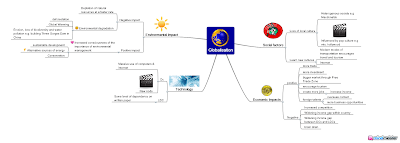
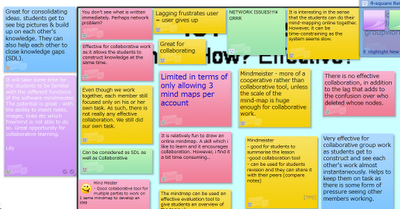
We tried mindmeister on the topic of globalisation. This is much better than Freemind in that images, notes and links can be inserted. The members of the shared map can work collaboratively in creating the mindmap. You can create the icon on the bottom menu (1st icon on left)- toggle on the history of the creation of the mindmap.

Teacher can track the process by looking at the history. Teacher can also track who has contributed to the mind map. The students can revisit and work on the map again. The teacher can also create a template for the students to work on. Allow collaboration, sharing, changes and improvements to be made.

Question of assessment?
Challenges: Bandwidth, logistics, booking of computer labs, back-up plan e.g. worksheets, classroom management.

Part of ICT training rather than subject time - so that they are familiar with it and they can anchor and apply in other subjects.

Webspiration - advantage - many ready templates for use. Allow the students to work collaboratively - like a whiteboard. It can be embedded and exported as well. The map can be shared and embedded in blogs or websites. It can also be exported in pdf or gif format.


Activity 2: Forum discussion
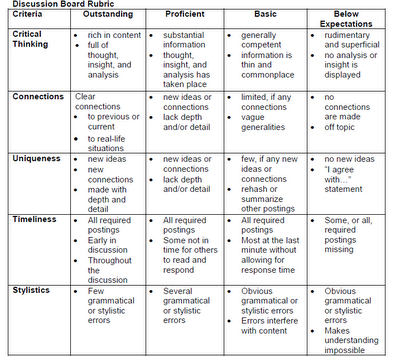
We tried this on the asknlearn platform. The teachers can export the discussion in excel format and do the grading with the rubrics generated from Rubistar.

Threaded - can see who responded. Allow students to think and post at their own pace with thoughts. Spell check function. Teacher can remove post or ban user.

Challenges - motivation, time-consuming
Source/ pictures as a stimulus, graded
Classroom opportunities or out of the classroom context.

Activity 3:
We made use of prezi for the presentation of a personality linked to globalisation. Our group worked on Mark Zurkenburg, the founder of Facebook.
Other presentation tools includes animoto, photostory 3, VoiceThread, Acapela.tv, comic strips such as toondoo and bitstrips

Additional Resource:
You may find additional lesson resources on globalisation in edumall shared and uploaded by CPDD. Please access edumall here.
Lesson Package on Airbus (104.2MB) includes video http://library.edumall.sg/cos/o.x?c=/library/reslib&uid=&ptid=84&func=view&id=52096&fext=.zip
Lesson Package on Kyoto Protocol (114.5MB) includes video http://library.edumall.sg/cos/o.x?c=/library/reslib&uid=&ptid=84&func=view&id=52095&fext=.zip Short Clip on iPod (video) http://library.edumall.sg/cos/o.x?c=/library/reslib&uid=&ptid=84&func=prop2&id=43907
 There are other resources on weblinks and newslinks, etc. at the site.

Other resources 
1. You may want to refer to the Language Page for additional resources here
2. Cooltoolsforschools
3. Cool tools - educational games 
4. Bloom's and ICT tools
 5. Simple K12

Here are some other more popular online rubric makers
http://www.teach-nology.com/web_tools/rubrics/
http://www.rcampus.com/indexrubric.cfm

Mar 31, 2011

ICT mentor program Day 2

Activity 1: Fairy Tale with Voice Thread We created a fairy tale using powerpoint and used the rubistar to generate the rubrics - easy to use and I love it! http://rubistar.4teachers.org/ The powerpoint is then uploaded onto voice thread and shared. We copied the html code by clicking on embed. The html code is then pasted onto the google site for sharing and the rubrics are attached as attachment.

All the groups commented on other groups' works by clicking on comment. The commentary can be recorded and parts of the slides can also be highlighted. A virtual gallery walk is created. The circle of knowledge and virtual gallery walk strategies are used in this activity. Some other suggestions on the use of voicethreads: e.g. Humanities - a source is posted and the students comment on it. LJ presentation by groups - can be used together with blogs. Science - planning of experiments. Another useful link - http://classtools.net/ for random name picker. Very colourful graphic and "IR" aligned.Another useful tool in activity 2 - Diigo.com and diigo toolbar - articles can be shared in a group and essential points in an article can be highlighted and sticky notes with comments from the group members can be added. Activity 2: Energy Scenario:

  • Our town is growing quickly and needs more energy.

  • Which type of Energy plant should we build: fossil fuels or nuclear?

  • We'll be discussing our preference of Energy Plant in the upcoming Virtual Townhall Meeting.
Research:

  • In pairs, source for articles/ resources related to fossil and nuclear energy that would substantiate your choice of energy.

  • One member of the pair will bookmark resources using Diigo.

  • Annotate why it supports the justification of your choice of energy.

  • Share your bookmark with another pair who are in the same role. Respond to the annotations.
Advantages of using Diigo - ability to annotate and the pages will be stored on the net. Bookmark to Diigo - if not shared it would go to my library. Wthin diigo - you can add friends after sharing with groups. Role of students:

  • Research and look for information

  • Open minded attitude – learning to look at different perspective

  • Check the source to ensure reliability

  • Cyber wellness – respect intellectual copyright – paraphrase and acknowledge sources

  • Analyse the resources

  • Highlight pertinent points

  • Appropriate comments

  • To think through information to make public
Role of teacher:

  • Moderator, facilitator

  • Ensure websites are appropriate

  • Give websites to students (control environment)

  • Model useful and constructive comments

  • Questioning techniques (Devil’s advocate)

  • Appropriate search skills

  • Teach information literacy and cyber wellness
Revisited coveritlive.com for the live discussion on the topic of energy. After that we tried podcast - educator's statement belief. Vocaroo is down so we used sound recorder. Activity 3: Podcast using vocaroo/sound recorder
How to type in presentation mode?

In Office XP - click on control toolbox - view toolbars and click on control toolbox submenu - then select textbox
In Office 2007 - click on the window logo - powerpoint options popular -check show developer tab

Mar 30, 2011

ICT mentor program Day 1

Learnt about Linoit sticky notes from the day 1 program and decided to try it out. I have set the first one without the ability for public to post and the second one open to post. Sign up for the account free @ http://linoit.com/home The other tool which we use extensively today is Google document to create feedback/consolidate ideas. The consolidated ideas can be further highlighted/clarified by the facilitator. I had explained how it was used in 2009 http://ezitnew.blogspot.com/2009/11/google-documents.html

In fact I have extended the use together with glogster for a VE lesson in 2010. I have used the form to collect responses for the lesson - it was effective as the form allowed the info to be consolidated instantly and it saved paper. Students are more engaged with this new e-form compared to a paper worksheet. http://ezitnew.blogspot.com/2010/08/national-ict-sharing.html

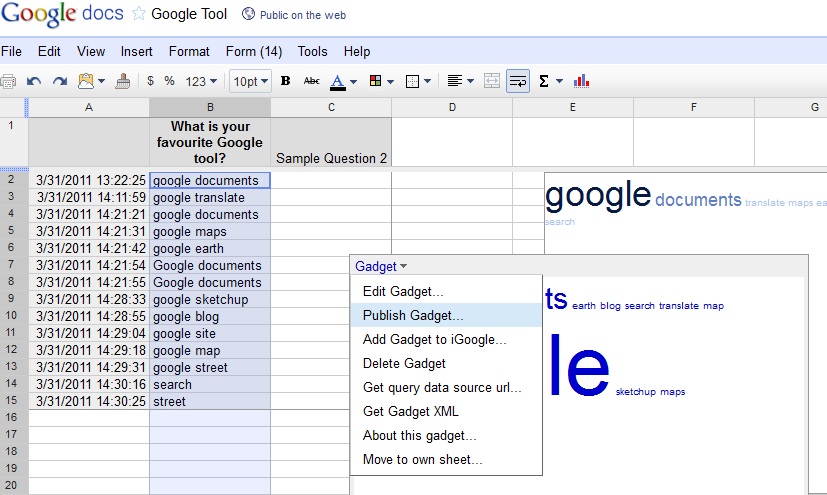
Other tools introduced were Google word cloud and http://www.coveritlive.com/.%20I was very impressed with the use of word cloud - I think it would be a fantastic tool for brainstorming. A question was asked and the participants entered a word/phrase into a box. All the responses are collated and entries which have been submitted more will actually appear bigger. This was done using google form. After creating the form with 1 question (text box). Open the spreadsheet and insert the gadget - word cloud or advanced word cloud. As shown below, once the gadget is inserted, it will appear on the spreadsheet. Just click on the top left hand corner and click on publish Gadget. Copy the html code to your site or blog. I could not paste it here as it conflict with my blog account.

The coveritlive.com tool was used together with the fish bowl strategy. A group form the inner circle and discuss on a topic. The group in the outer circle will observe the discussion and record their observations on coveritlive.One thing good about this tool is that if you click on the bubble at the button of it - you will be able to translate it to another language. A poll (quiz) was also integrated. He mentioned that the postings can be archived and the group could go back to it to check the responses.

You can view our live discussion here: http://www.coveritlive.com/index2.php/option=com_altcaster/task=viewaltcast/altcast_code=d7bc0e35df/height=800/width=800

Another good link for educator - educational videos from edutopia: http://www.edutopia.org/east-technology-lab-video

We watched the one on East - A way forward.