Just paste the text and you can download the audio file

Showing posts with label Podcast. Show all posts
Showing posts with label Podcast. Show all posts
Nov 16, 2011

Mar 31, 2011
ICT mentor program Day 2
Activity 1: Fairy Tale with Voice Thread We created a fairy tale using powerpoint and used the rubistar to generate the rubrics - easy to use and I love it! http://rubistar.4teachers.org/ The powerpoint is then uploaded onto voice thread and shared. We copied the html code by clicking on embed. 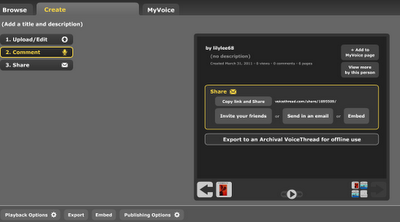 The html code is then pasted onto the google site for sharing and the rubrics are attached as attachment.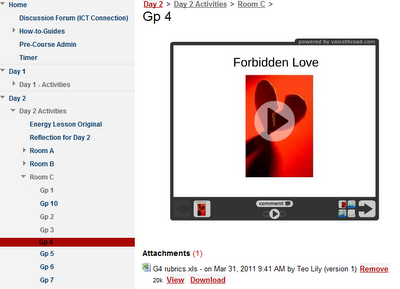
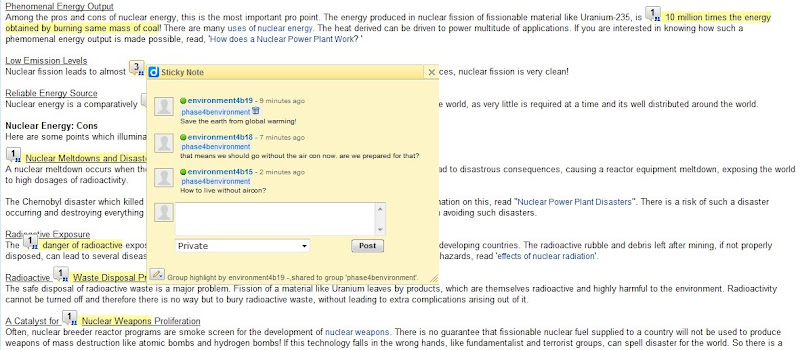
All the groups commented on other groups' works by clicking on comment. The commentary can be recorded and parts of the slides can also be highlighted. A virtual gallery walk is created. The circle of knowledge and virtual gallery walk strategies are used in this activity. Some other suggestions on the use of voicethreads: e.g. Humanities - a source is posted and the students comment on it. LJ presentation by groups - can be used together with blogs. Science - planning of experiments. Another useful link - http://classtools.net/ for random name picker. Very colourful graphic and "IR" aligned.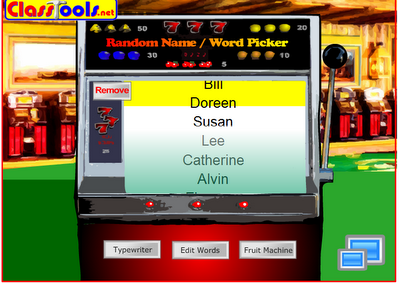 Another useful tool in activity 2 - Diigo.com and diigo toolbar - articles can be shared in a group and essential points in an article can be highlighted and sticky notes with comments from the group members can be added. Activity 2: Energy Scenario:
 Role of students:
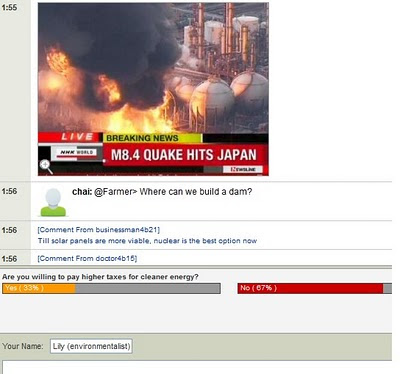 After that we tried podcast - educator's statement belief. Vocaroo is down so we used sound recorder. Activity 3: Podcast using vocaroo/sound recorder
How to type in presentation mode?
In Office XP - click on control toolbox - view toolbars and click on control toolbox submenu - then select textbox
In Office 2007 - click on the window logo - powerpoint options popular -check show developer tab
 The html code is then pasted onto the google site for sharing and the rubrics are attached as attachment.

All the groups commented on other groups' works by clicking on comment. The commentary can be recorded and parts of the slides can also be highlighted. A virtual gallery walk is created. The circle of knowledge and virtual gallery walk strategies are used in this activity. Some other suggestions on the use of voicethreads: e.g. Humanities - a source is posted and the students comment on it. LJ presentation by groups - can be used together with blogs. Science - planning of experiments. Another useful link - http://classtools.net/ for random name picker. Very colourful graphic and "IR" aligned.
 Another useful tool in activity 2 - Diigo.com and diigo toolbar - articles can be shared in a group and essential points in an article can be highlighted and sticky notes with comments from the group members can be added. Activity 2: Energy Scenario:
 - Our town is growing quickly and needs more energy.
- Which type of Energy plant should we build: fossil fuels or nuclear?
- We'll be discussing our preference of Energy Plant in the upcoming Virtual Townhall Meeting.
- In pairs, source for articles/ resources related to fossil and nuclear energy that would substantiate your choice of energy.
- One member of the pair will bookmark resources using Diigo.
- Annotate why it supports the justification of your choice of energy.
- Share your bookmark with another pair who are in the same role. Respond to the annotations.
 Role of students:
 - Research and look for information
- Open minded attitude – learning to look at different perspective
- Check the source to ensure reliability
- Cyber wellness – respect intellectual copyright – paraphrase and acknowledge sources
- Analyse the resources
- Highlight pertinent points
- Appropriate comments
- To think through information to make public
- Moderator, facilitator
- Ensure websites are appropriate
- Give websites to students (control environment)
- Model useful and constructive comments
- Questioning techniques (Devil’s advocate)
- Appropriate search skills
- Teach information literacy and cyber wellness
 After that we tried podcast - educator's statement belief. Vocaroo is down so we used sound recorder. Activity 3: Podcast using vocaroo/sound recorder
 How to type in presentation mode?
In Office XP - click on control toolbox - view toolbars and click on control toolbox submenu - then select textbox
In Office 2007 - click on the window logo - powerpoint options popular -check show developer tab
Aug 13, 2010
National ICT sharing.
Attended 2 sessions in the National ICT sharing @ Kranji Sec today. Web 2.0 Tools - Podcast and Glogster - in the Multi-disciplinary classroom from Bedok View Secondary Podcast: http://voicethread.com/ http://vocaroo.com/ Glogster: http://glogster.com/ http://edu.glogster.com/ Can be used as a project for collaborative learning and self-directed learning for students. Students take pride in their own creation and motivate them to learn further. Found this rubric on glogster which you can use to grade the projects - click here. Can also be used as a tool for instruction - teacher create glog with all the links such as videos, forums, reflections etc on the glog. e.g. Glog on Bursting Stereotypes. Tried it out myself for the VE lesson on the topic Integrity using glogster and google doc for the form: http://mrslilylee.glogster.com/integrity Digital Scrapbook for EL and Humanities Independent Learning - from Siglap Secondary http//scrapblog.com Easy editing and inserting of: photos and videos sound effects Application: Photo Journals on 3Rs Future Humanities Application: Useful for large no. of photos, diagrams, videos and animations formative assessment Some ideas for: Geography Photo documentary of rivers or learning journey Photo journal of pollution case studies History Documentary of Japanese Occupation: Photos of atrocities and commentaries of survivors Social Studies Photo diary of Northern Ireland Conflicts How is assessment done? via online download and print (credits needed) Pros: Designed templates available creative and aesthetically pleasing way to display information engaging, motivating and rewarding easy to use designed for Web 2.0 - can post online (facebook, blog, twitter etc) and allow sharing user friendly mini photoshop tools available can insert videos from Youtube Cons: Credits needed for exclusive designs and export features - however free designs are more than sufficient cannot work online - however work can be shared and data saved in cloud is secure. Works well with wireless@sg I have tried creating one myself - http://www.scrapblog.com/viewer/vw_full.aspx?sbid=2824633 


Mar 5, 2010
iCTLT Day 2
Concurrent Session 4: Harnessing the Benefits of Wikis for Overseas Fieldwork Research Trips By Hong Thin Yong from Kent Ridge Sec School Wiki as a Web2.0 tool was used to facilitate the organization and planning of an overseas fieldwork. Nov 2008 – 8-day trip to Tasmania Challenges: Admin work – collection of forms Personal reflections Difficult to find common time for discussion and feedback Competency in using fieldwork equipment So what is a wiki? http://pbwiki.com/ http://wetpaint.com/ (ad-free for wikis used for educational purpose) http://wikispaces.com/ http://www.wikisandbox.com/ To experiment with wikis Comparison of wiki and blog Is it complicated to use? Privacy? Tracking http://krsstassiefieldtrip.wetpaint.com/ How was the wiki used 1. Admin work – to disseminate info and doc, soft copies of briefing doc, itinerary etc http://www.box,net/ to store the documents privacy, teacher save time, less paper wastage, min lesson disruptions by frequent meetings, students take responsibility of checking updates 2. Preparing students for the fieldtrip – equipment, instruction how to write report Students could access and read up info anytime – students are responsible for their learning, more engaged 3. Reflection -set up individual page for reflections – students design their own page, personalize them, peers can read their entries and the teacher can track – pre-trip and post-trip reflection 4. Background information e.g. one group assigned on education, minimize work duplication – encourage collaborative efforts e.g. a girl posted on the forum links that will help another group in their research 5. chat room, keep parents informed, online photo album, presentation slides
Powerpoints for download: 2009-12-29_19-31-29_Harnessing_benefits_of_wiki_for_overseas_fieldwork_research_trips.ppt Harnessing_benefits_of_wiki_for_overseas_fieldwork_research_trips.ppt Wiki_vs_Blog.doc UnEarth! Google Earth as a Learning Tool to Aid Geographical Education By Melvin Chng Eng Hee fr Crescent Girls’ Sch Schultz - Spatial literacy skill is needed Spatial knowledge, thinking and acting, spatial abilities Spatial awareness help to horn self concept – to relate ourselves to larger community in the world - Snowman and Biehler 2008 To what extent does google earth facilitate students’ skill in map reading? Control group of 26 girls, experimental group of 16 girls Pre-lesson survey – Do you like map reading? yes Do you find map reading difficult? Manageable, info provided How interested are you in map-reading? (interest – wanting to know about map reading outside class) Fairly interested, Lesser Antilles Lesson – basic skills to navigate google map, familiarize with the functions – zoom in and out, place mark etc Control group used only topo maps Ellis Peak and Ellen Mount lesson – measure gradient and compare with the google map, control Manipulate terrain perspective Save kmz file title: calculation of gradient Ellis Peak Mississippi River lesson – measure gradient, identify ox bow lake Coastal landscape lesson Post lesson surveys and tests ( Map qn and test w 2 Qn) How much do you like map reading now? Experimental group increase in liking whereas the control group has a decline in liking Model Making task Challenges Selecting images which are clear enough to map onto topographical map. Suggestion – contextualized – e.g. go to the Amazon to rescue a girl trapped etc.. Suggestion: Click on volcano icon to see the volcano layer
Presentation download: 2009-12-02_14-10-55_Crescent_Girls_School_AR_Paper-Unearth!.pdf 2009-12-15_10-37-57_1208-310709(Crescent_Girls_School)-Presentation_Slides.ppt Presentation-_Unearth.ppt
Enhance Students’ Analytical Skills with Podcast By Melanie Morisette from School of Film and Media Studies, Ngee Ann Polytechnic Podcasting – ipod + broadcasting record lectures reflection and interviews news or course related updates Youtube generation – more time on computer as compared to watching TV, prefer to select the content they watch Podcast showcase: Joshua Simon – analyzing the film fight club Horizontal learning: opportunities to interact and lean from others Students showcase their learning, With an audience, they are more motivated and competitive. Youtube. Tips for use of podcast - Learn to create a podcast yourself - Although it is an AV work, ask students to write down their text ( more coherent, authenticity of work – not something from internet) - Introduce your students to the effective use of visual and aural elements in their presentation - Require students to use proper citations - Introduce students to creative commons – CC mixer –must credit to author’s name - Image content on flickr Tips of grading podcast - grade the execution of the podcast other than content - delivery – rehearsed and smooth - graphic and music enhancement - audio recording - audio mix of music, video and mix E.g Streamed podcasts from iTunes, Juice or winamp
http://sgNewWave.com/main/ Learning is a social process Podcast is made for an audience – more engaged and competitive Learning is reflective – students enjoy the opportunity to share what they know about a topic. Affordances of Podcast - Easy access resource - Presence and self-expression - Creation of new content - Foster interaction - Contributes to the student’s portfolio and online presence http:// juicereceiver.sourceforge.net http://doppleradio,net http;//odeo.com http://www.apple.com/findouthow/music/#podcast Presentation download2010-01-13_09-48-01_672-230709(Ngee_Ann_Polytechnic)-Presentation_Slides.pdf Enhance_Student's_Analytical_Skills_with_Podcast.key.pdf Integral Teamwork: Blogging as a Journal of Learning By Leslie Tan from School of Film & Media Studies, Ngee Ann Polytechnic Story telling Keeping a journal – reflection Common reactions – resistance, frustration, fear Perception of journals Paper – laborious, solitary, artificial, academic Blog – a web site in which an indicidual or group of users produces an ongoing narrative, Dictionary.com Digital – engaging, collaborative, authentic and personal Collaborative – “plse feel free to comment” – realize that people was reading Why use blogs? – accessible, simple and fun ( appeals to the attention seeker in all of us) Warning: Privacy issues Sensitive subjects Flaming Obscene/explicit material Accidental deletion Presentation download
2009-12-23_18_40_11_ictlt-leslietanblogging-pres-01.pdf ICTLT-Blogging-PRES-02.pdf Leslie Tan's blog http://redpants.wordpress.com/
Subscribe to:
Posts (Atom)