Showing posts with label popplet. Show all posts

Mar 4, 2014

Using popplets for presentation and collaborative learning

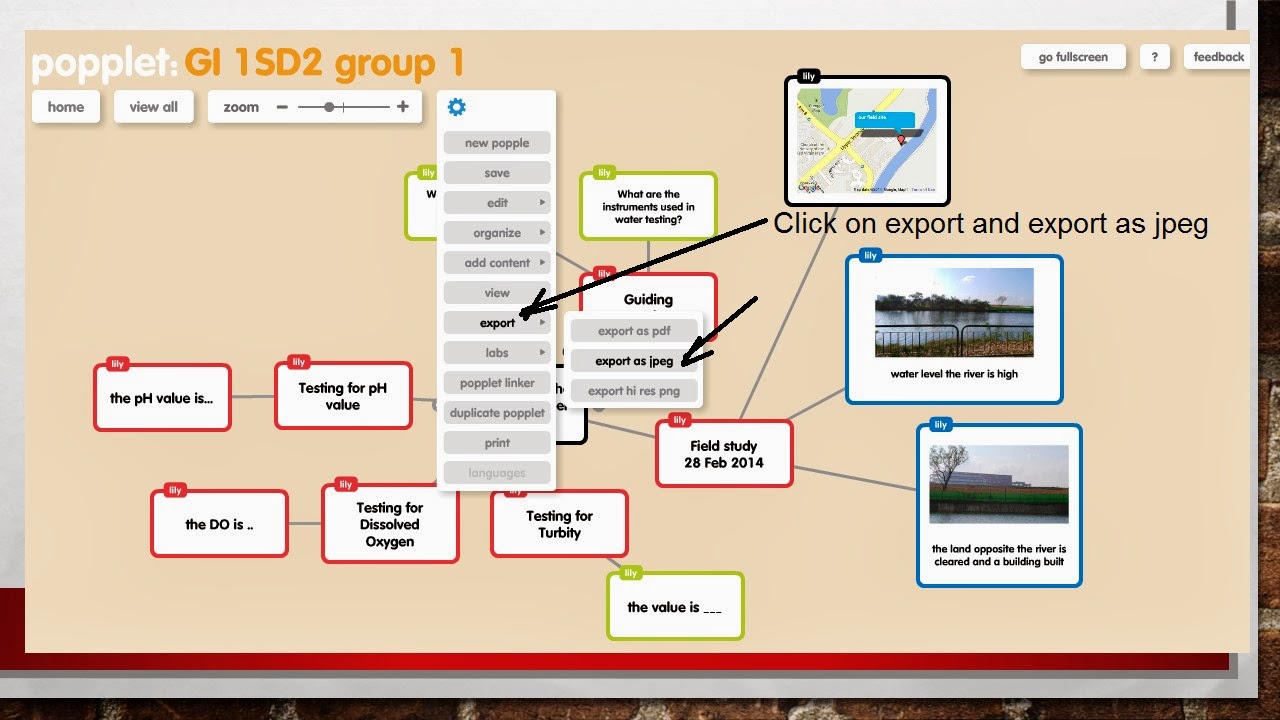
The Sec 1 used popplets to present their findings for their Geographical investigation on how clean the water is at Sungei Serangoon. It's good for them to use popplets as they can collaboratively work on the project - inserting a google map of the field site as well as pictures and findings of their investigation.
 
The following is the instruction on how to create popplets:
Sign up a new account @ http://popplet.com/app/#/signup
you can then login with http://popplet.com/app/#/home


My Sec 4 classes also used it as a collaborative tool to summarise their learnings on the topic tourism. This is the virtual gallery of their mindmaps using popplets - http://tourismpopplet.blogspot.sg/

Jul 28, 2013

Popplets


Create a mindmap using popplet on the hazards associated with earthquakes. 

Create a new account with http://popplet.com – then create a new popplet.

Click on the 'A' icon at the bottom of the popple to type. You can also change the colour of the popple. Click on the circle at the sides of the popple to make new links. You can insert pictures or even youtube video by clicking on the picture icon at the bottom of the popple. You can extend your popple by clicking on the triangle on the four corner of the popple.
 

Remember to save the file.  You can export it as a pdf or jpeg file.


To encourage Collaborative learning - you can get the students in groups and then get the team leader to invite the team members to collaborate. The collaborator names will appear on top of the popple  they created.

You can even click on lab - show timewarp to see the process of collaboration - ie - time in which collaborator contribute a certain point.