
May 29, 2013
powtoon - creative online presentation tool
http://www.powtoon.com/home/
One of my colleagues used this online tool for her presentation today - impressive! Sharing with all - awed your audience with your presentation using this tool! Students will find creating their presentation more exciting too. A sample on climate change shown below:

Apr 6, 2013
sharing on the use of blogs
Quite glad that a few teachers I met @ the humanities network sharing have already made use of the resources I put up on my Geography Blog.
It has also been very encouraging to know that a number of teachers have been inspired to start blogging after visiting mine!
My presentation slides below:
It has also been very encouraging to know that a number of teachers have been inspired to start blogging after visiting mine!
My presentation slides below:
Blog humanities sharing from Lily Lee
You can see my post on how to create a blog @ http://ezitnew.blogspot.com/2011/07/passion-day-sharing-blog-design.html
Feb 7, 2013
Glogs - High-tech farming
The students were asked to design a glog to present on high-tech farming in Singapore. They were expected to insert a video, at least a photo and write-up on how aeroponics is carried out and why high-tech farming is suitable for Singapore. I have used linoit below for them to post the links to their glogs. The links had also been sent to my email under notification from linoit. Here the students can also do a virtual gallery walk by visiting the glogs created by their peers.
As mentioned in my earlier post. The use of Glogs encourage students take pride in their own creation and motivate them to learn further. There is SDL as the students can continue to research and learn beyond the classroom.
2H4 - post the links to your Glogs here:
2H7 - post the links to your Glogs here:
I have also used it as a tool for instruction - teacher create the glog with all the links such as videos, forums, reflections etc on the glog. e.g. Glog on Bursting Stereotypes. Tried it out myself for the VE lesson on the topic Integrity a few years back using glogster and google doc for the form: http://www.glogster.com/mrslilylee/integrity

As mentioned in my earlier post. The use of Glogs encourage students take pride in their own creation and motivate them to learn further. There is SDL as the students can continue to research and learn beyond the classroom.
2H4 - post the links to your Glogs here:
2H7 - post the links to your Glogs here:
I have also used it as a tool for instruction - teacher create the glog with all the links such as videos, forums, reflections etc on the glog. e.g. Glog on Bursting Stereotypes. Tried it out myself for the VE lesson on the topic Integrity a few years back using glogster and google doc for the form: http://www.glogster.com/mrslilylee/integrity

As mentioned the students' responses are captured on the form which I have created on my drive (ICON) and I can easy view the individual response or see the summary of response as I did above. It also save on paper and I could view their responses anytime, anywhere!
Nov 15, 2012
Videos for T&L
There is a rich pool of videos which we can tap on for teaching and learning:
Youtube
Teachertube
Vimeo
CNA Video
RazorTV
News from HD5 on youtube
I have embedded quite a number of videos from CNA and RazorTV on my blogs to update the students in the latest development in Geographical issues
Youtube
Teachertube
Vimeo
CNA Video
RazorTV
News from HD5 on youtube
I have embedded quite a number of videos from CNA and RazorTV on my blogs to update the students in the latest development in Geographical issues
Nov 10, 2012
ICT sharing by English teacher
So happy that my colleague teaching English language started her blog to share the use of ICT - http://beworldlywise.blogspot.sg/
Nov 9, 2012
Powerpoint Games
Discover a site which uses powerpoints to generate games for lessons - http://people.uncw.edu/ertzbergerj/ppt_games.html
One example will be what is behind the box which you can download from the link above.
Download What's Behind the Box 8
Download What's Behind the Box 16
One example will be what is behind the box which you can download from the link above.
Download What's Behind the Box 8
Download What's Behind the Box 16
Instructions:
1. Teacher or Trainer places unique background images (just insert a picture and right click on the picture and 'send to back' on the pop up menu) behind four to five slides.
To Play:
1. Teacher or Trainer places unique background images (just insert a picture and right click on the picture and 'send to back' on the pop up menu) behind four to five slides.
To Play:
1. Divide into Teams.
2. Each team is asked a question. If they answer correctly, the
teacher clicks the Remove box button one time.
3. This removes one box from the board, if the team can guess
what the picture is correctly, they win. If they cannot guess it correctly the
game continues.
4. Once a team has correctly identified the picture, teacher
clicks the next slide button in the upper right to go to the next board.
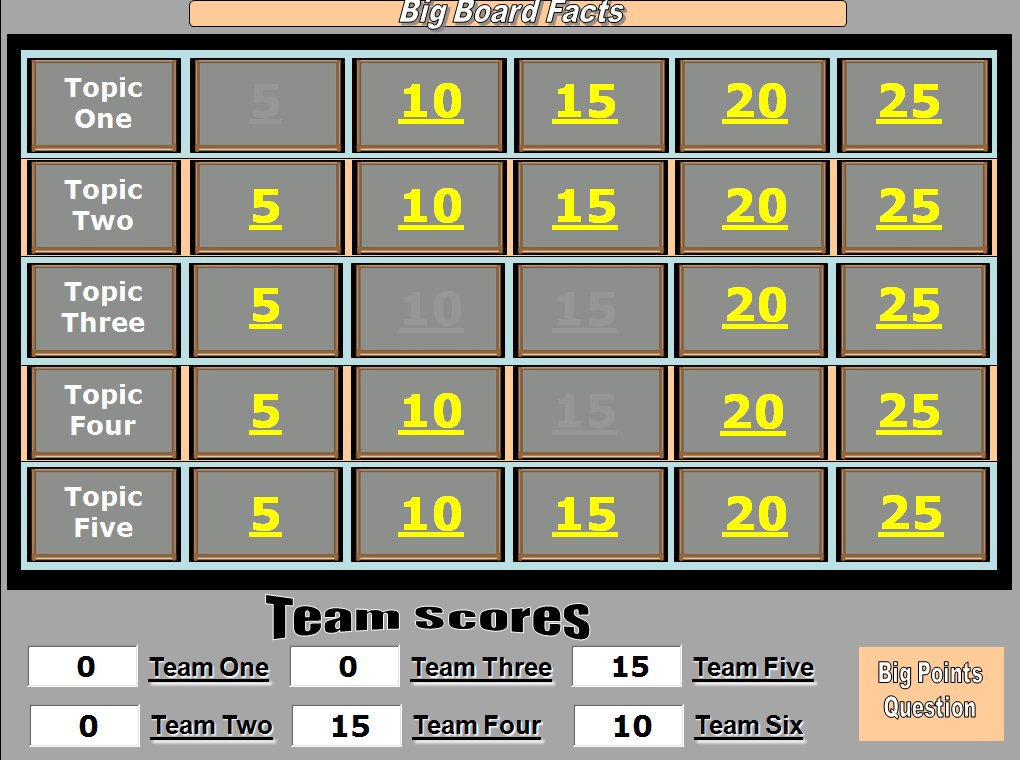
I like the big board game too - just replace the topics and the questions.
The teams get to choose the topics and the questions.
If they get it right the points are recorded at the bottom of the board.
Download Big Board Facts
Download Big Board Facts with Answers Slide

I like the big board game too - just replace the topics and the questions.
The teams get to choose the topics and the questions.
If they get it right the points are recorded at the bottom of the board.
Download Big Board Facts
Download Big Board Facts with Answers Slide
Oct 4, 2012
ICT mentor sharing 18 Oct 2012
Peihwa Sec ICT mentor sharing now -http://linoit.com/users/fahmie/canvases/ICT%20Mentor%20Programme-Session%204
Handson - http://ruslinys.wix.com/question2
I tried it out the wix myself- quite a easy-to-use website builder.
http://lilylee.wix.com/mrslilylee
http://lilylee.wix.com/sec2geog
Was also encouraged to email fahmie_abdat@moe.edu.sg for new lesson plan based on any ICT tools
I have tried out Weebly - another website builder last year:
http://singaporegeography.weebly.com/index.html
http://singaporesocialstudies.weebly.com/
Comparing Wix with weebly from http://getawebsitebuilder.com/comparison/wix-vs-weebly
My comment: Though Wix looks impressive with the flash interface and free templates, I am quite hesitant to use it long term as the disk space for the free version is only 500MB.
I remembered when I first started my website in 2002 - I used Yahoo page builder. I had to migrate some to blogger after they decided to impose a charge somewhere in 2006...it was a nightmare as I had over 20 sites and I lost some data as I could not transfer the data for some. However WIX will be a useful website builder which the students can use to present and reflect on their findings. It is user friendly and the graphics is visually appealing.
Google site is another useful website builder which you might want to try.
I am still more comfortable with blogspot.com - faster updates!
Handson - http://ruslinys.wix.com/question2
I tried it out the wix myself- quite a easy-to-use website builder.
http://lilylee.wix.com/mrslilylee
http://lilylee.wix.com/sec2geog
Was also encouraged to email fahmie_abdat@moe.edu.sg for new lesson plan based on any ICT tools
I have tried out Weebly - another website builder last year:
http://singaporegeography.weebly.com/index.html
http://singaporesocialstudies.weebly.com/
Comparing Wix with weebly from http://getawebsitebuilder.com/comparison/wix-vs-weebly
My comment: Though Wix looks impressive with the flash interface and free templates, I am quite hesitant to use it long term as the disk space for the free version is only 500MB.
I remembered when I first started my website in 2002 - I used Yahoo page builder. I had to migrate some to blogger after they decided to impose a charge somewhere in 2006...it was a nightmare as I had over 20 sites and I lost some data as I could not transfer the data for some. However WIX will be a useful website builder which the students can use to present and reflect on their findings. It is user friendly and the graphics is visually appealing.
Google site is another useful website builder which you might want to try.
I am still more comfortable with blogspot.com - faster updates!
ICT mentor sharing 20 Sept 2012
Evaluating the Effectiveness of the WFP through Food Force Game
Sharing by Pei Hwa Secondary in the latest ICT mentor sharing:
First Task: Students to download and play Food Force game .
download game - http://www.download-free-games.com/freeware_games/food_force.htm
or play on facebook http://apps.facebook.com/foodforce/
Students will download and play Food Force game at home or they can play it on facebook).
The students are required to complete all 6 missions in which they will realise the difficulties organisations face when providing food aid to countries. Students will then research for real examples cited in the WFP website that substantiate their findings from the Food Force Game and thereafter use the examples in to help answer the evaluative question on WFP.
More details available on edumall http://ictconnection.edumall.sg/cos/o.x?ptid=711&c=/ictconnection/ictlib&func=view&rid=968 - login needed.
Sharing by Pei Hwa Secondary in the latest ICT mentor sharing:
First Task: Students to download and play Food Force game .
download game - http://www.download-free-games.com/freeware_games/food_force.htm
or play on facebook http://apps.facebook.com/foodforce/
Students will download and play Food Force game at home or they can play it on facebook).
The students are required to complete all 6 missions in which they will realise the difficulties organisations face when providing food aid to countries. Students will then research for real examples cited in the WFP website that substantiate their findings from the Food Force Game and thereafter use the examples in to help answer the evaluative question on WFP.
More details available on edumall http://ictconnection.edumall.sg/cos/o.x?ptid=711&c=/ictconnection/ictlib&func=view&rid=968 - login needed.
Glogsters for Sharing
Sep 18, 2012
N3 Cluster ICT Symposium Sharing on Prezi
I shared with some teachers from the N3 cluster during the ICT symposium on how I used Prezi, Linoit and Blog for my Sec 2 class on tourism today.
You can refer to my earlier post on how to use Prezi -http://ezitnew.blogspot.sg/2012/09/prezi.html
For Linoit you can refer to my post on http://ezitnew.blogspot.sg/2011/09/creating-sticky-note-and-embed-in-your.html
For Blog you can refer to my post on http://ezitnew.blogspot.sg/search?q=blog
My students' works are on http://2etourism.blogspot.sg
The powerpoint which I used today:
You can refer to my earlier post on how to use Prezi -http://ezitnew.blogspot.sg/2012/09/prezi.html
For Linoit you can refer to my post on http://ezitnew.blogspot.sg/2011/09/creating-sticky-note-and-embed-in-your.html
For Blog you can refer to my post on http://ezitnew.blogspot.sg/search?q=blog
My students' works are on http://2etourism.blogspot.sg
The powerpoint which I used today:
Sep 13, 2012


Subscribe to:
Posts (Atom)