Jul 1, 2015

N3 ICT symposium 2015

I shared the use of Kahoot @ N3 ICT symposium 1 July 2015:


Kahoot presentation from Lily Lee

Just learned that Kahoot introduced the Ghost mode. Please see my earlier post which I have updated - http://ezitnew.blogspot.sg/2015/01/kahoot-online-quiz.html Great that we can now get the students to do the quiz again. 

I have some of the kahoot in Ghost mode on the links below.
https://sites.google.com/a/moe.edu.sg/sec3geog/kahoot---revision-quiz
https://sites.google.com/a/moe.edu.sg/sec-4-geography/kahoot-quiz

I have also attended the sharing by my colleague, Mr Shaw Wee.  He has presented on the use of Video Physics app Vernier - available on IOS (Apple) to understand the relationship between velocity and acceleration.
  1. capture a video of objects thrown vertically and also capturing horizontal movement
  2. track the movement
  3. analyse the data
A similar one on android will be Physics Gizmo - https://play.google.com/store/apps/details?id=com.brokenairplane.physicsGizmo&hl=en  free

An interesting app shared during the ICT symposium - Aurasma

It can be downloaded from App Store for IOS and Play store for Androids (however my Samsung Note 4 is not compatible and cannot download it. It works on my Samsung Galaxy Pro)
The app offers a lot of potential in creating virtual learning. 
Tutorial on ipad: https://www.youtube.com/watch?v=VJ_UEfoNzbI


Aurasma allows users to create or view augmented reality experiences. The user open up the app and capture the photo with the camera. The image will transform into a video, animation, another image or bring you to a website with more information. 
To create their own Auras, students or teachers choose an overlay and a trigger. An overlay is a video, image, an animation or a website link that will appear when someone finds the trigger object or photo. 
Tutorial on creating a sequenced aura using the aurasma studio https://studio.aurasma.com/login
https://youtu.be/CaczBAfdRns - so cool being able to create a scavenger hunt with photos. User just scan the photo and could see a video or even a url link providing more information.

Use of Aurasma in teaching:

https://youtu.be/uHIxYpBW7sc?list=PLYk2ySKukLs6Fih_6xze0EYRyGJguDYCF

Use of Aurasma in learning nature:

https://youtu.be/WRS_nZOOMyY?list=PLYk2ySKukLs6Fih_6xze0EYRyGJguDYCF


Apr 27, 2015

Sharing more class tools

I have always loved classtools.net - http://www.classtools.net/
I have used it to create quiz/game for students for their self-paced revision on my Goggle site. I have tried the following other than the name picker and fruit machine which I had introduced below:

1. Categorise the hazards according to the type or the cause - is it climate related or tectonic related hazards:  http://www.classtools.net/widgets/dustbin_6/l2oKq.htm  This was created using the dustbin generator. 


2. View the gallery on the maps and diagrams on plate tectonics: 
http://www.classtools.net/3D/201504_32MEMe This was created using the 3D gallery.

3. Using clues about volcanoes to find out where they are located:
http://www.classtools.net/mapgame/11_BULDZ9  This was created using the mapgame creator.

4. I will be trying out this in future - QR code Treasure hunt -http://www.classtools.net/QR/  
You just need to input the questions and the QR codes will be generated. You can then print the QR codes and place it at different locations. The students will use the QR code reader to find out the questions and answer them.

Jan 26, 2015

Name picker

I love this class tool  random name picker in the form of a roulette as I can save my list and then add them as favourite on my browser bookmark.
I do not need to copy and paste the class list repeatedly as it is saved.  The only limitation is that it can only cater to less than 50 -http://www.classtools.net/random-name-picker/ .

The class tool fruit machine is better in that it can cater for a larger number of more than 200 - http://www.classtools.net/main_area/fruit_machine.swf


However the class tool fruit machine is still great as a name picker as it can cater to a longer list of names e.g. more than  200. http://classtools.net/main_area/fruit_machine.swf


The fruit machine is also great for choosing words by random to get the students to familiar with important concepts.


 This can also be used for Chinese lessons in learning Chinese idioms.


Jan 25, 2015

Kahoot - online quiz

Kahoot is very similar to Socrative as a free online assessment tool - just that the element of gaming is stronger as the player is given a score based on accuracy and speed. As there are more students who own smart phones nowadays, using Kahoot to do a quick check on understanding with the element of game will definitely engage the students.

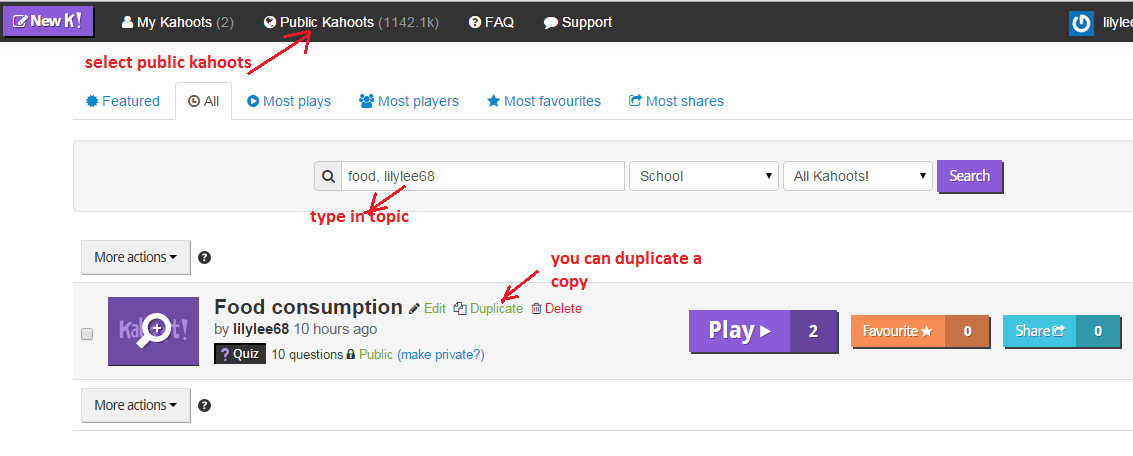
It is very easy to create the quiz. Just login to https://create.kahoot.it/ You can also create discussion or survey as shown below.


The following screen shoot shows what the students will see on his/her handphone.


The score is updated after every question!


 The winner is announced!


To launch the quiz again just login to https://create.kahoot.it/


You can also preview the game first.


After the game is played you can download the results in Excel format for analysis. 


I have some of the kahoot on the links below.
https://sites.google.com/a/moe.edu.sg/sec3geog/kahoot---revision-quiz
 

Kahoot has just introduced a new feature ‘Ghost mode’. 
After you finished a game of Kahoot! you will see a new ‘Play again’ button that also contains a ghost icon. 
When you click on the button, the same game is relaunched. As well as your ‘live’ class, all players are joined by their ‘ghosts’! The ghosts play the game alongside live players, and their answers (and answer times) will be exactly the same as those the players entered in the previous game.
Ghost mode is a great way to encourage the students to compete against themselves as well as each other. It gives the students a chance to beat their previous score and provides immediate feedback.The students can be given the link to the ghost mode and practice at their own pace.

 
An example of a ghost mode introduced in Nzone ICT mentor program on SG50 NE Quiz: 


Nov 22, 2014

sharing by tammy on ICT

http://tammyworcester.com/tech-tip-of-week/
another recommendation by ICT mentor learning committee.

would love to explore this - http://tammyworcester.com/batchgeo/ esp mapping water quality in various parts of Singapore.

101 Free Tech Tools for Teachers

Chanced upon this video on 101 Free Tech Tools for Teachers - http://www.youtube.com/watch?v=BffyLJmMJTM. Watch the seminar on the video and learn useful tools which you can use in your T&L!


http://www.instagrok.com/  - interactive concept map
http://storybird.com/educators/  create your own story
https://www.google.com/culturalinstitute/project/world-wonders -virtual field trip - bring your students all over the world!
http://www.kideos.com/ - videos for younger children
http://www.flubaroo.com/ help in grading quiz and assignment

https://titanpad.com/  log in back channel  - collaborative note, chat, centre portion is the collaboration, which student collaborated based on colour and can trace back time to see who contributed
https://www.classdojo.com/   online behaviour management - give student an avatar – assign positive and negative behaviour

http://www.toondoo.com/ digital story telling, able to save in computer
http://www.nitrotype.com/ learn typing via a fun way – racing
http://www.easel.ly/ create and share visual ideas online (infographics)

https://www.duolingo.com/ free language education for the world
http://www.pen.io/ easy to publish website online

http://www.spellingcity.com/ engaging games to learn spelling and vocabulary

http://en.linoit.com/  create a pen board which many can collaborate. Collaborative project

one board for one unit – pin their findings and learning

https://cel.ly/ e.g.  https://cel.ly/c/iste2013/landing  cell phone group for mass text

send message or poll, different cells for different group/class, set privacy setting e.g. cannot see their hp no., public or pte cell, great tool for communicating w parents and students

https://www.wunderlist.com/ -easy manage and share tasks and to-do list

https://learnzillion.com/ flipped classroom and blend classroom. Have pre-concept by looking at video etc before lessons

http://wigflip.com/automotivator/ - create motivation poster

http://www.screencast-o-matic.com/ - online screen recorder

create QR codes  and put them up around the classroom – access to videos created by https://www.educreations.com/


Apr 28, 2014

Flipped classroom

A lot of educators moving towards a flipped classroom concept and a lot of sharing was done during the ICTLT 2014:

What, Why And How To Flip - ICTLT keynote 2014 
http://www.ictlt.com/_downloads/special_session_1.zip

The Video Revolution - Tilting The Classroom, Flipping The School 
http://www.ictlt.com/_downloads/pid_105.zip

Interactive Video-Based Discussion – Rethinking The Flipped Classroom
http://www.ictlt.com/_downloads/pid_287.zip

Empowering Flipped Classroom In Singapore Classrooms: An Integrated Solution To Create and Distribute Media Learning Resources 
http://www.ictlt.com/_downloads/pid_57.zip

Love this one from ICTLT too - using coursmology to create a safe environment for students to explore using games.
http://www.ictlt.com/_downloads/pid_316.zip
http://coursemology.org/

Would also love to explore the following on flipped classroom too...
http://flippingblgps.weebly.com/
http://flippedlearning.org/domain/36
http://www.educanon.com/
http://www.edpuzzle.com/
http://exitticket.org
Flipping Mother Tongue sharing
http://socrative.com/

animation -http://www.moovly.com/

http://www.arcademics.com/ - building games

so much to learn - will explore the above in the holidays.

..
https://www.plickers.com/

Apr 27, 2014

Maths and Science simulations

Sharing by the ICT Mentor community for Maths and Science

Maths:
http://nlvm.usu.edu/ National Library of Virtual Manipulatives
https://www.mathdisk.com/ -create your own worksheets to visualize, interact with and explore the amazing world of mathematics.
https://www.mathway.com/  -  great tool for them to check their working and answers

http://www.geogebratube.org/user/profile/id/13731
- check out the interactive worksheets

http://illuminations.nctm.org/

Maths games:
http://www.mathplayground.com/

http://www.hoodamath.com/mobile/games/highschool.html

Science:
https://phet.colorado.edu/ science simulations
http://chemcollective.org/vlabs
http://prezi.com/cqnze-pvzonf/physical-quantities/
http://www.tes.co.uk/teaching-resource/Physical-Quantities-and-their-Units-6243213/