Mar 27, 2019

Google translate in Google Sheet

Google Translate in Google Sheets. Tried it out and it works... How can this be used in the classroom?


 Just use the following formula: =GOOGLETRANSLATE(A4,"en","zh")

 A4 being the cell which contains the words to be translated followed by the language it's in which is "en" (English), then the language to be translated to which is "zh" (Chinese)

 "in" Indonesian
"ja" Japanese
 "ko" Korean


=GOOGLETRANSLATE(B18,"auto","en")
Auto detect the language of the source


Mar 20, 2019

Momento360, Panoraven and InstaVR

Finally figured out how to embed the 360 photos using momento360.

1. Capture the photo or video using a 360 camera.

2. Upload your 360s from your computer or smartphone to Momento360.  Sign in, click on the camera icon in the top right corner, and you’ll be automatically prompted to choose the photos you want to upload.

3. Select the 360 you want to embed, then click on the share icon. You’ll see this: Click on “Share or Embed a Link,” then on “Create Link.” Select the link and copy it to your clipboard.

 4. Now you’re ready to embed the link on your blog or Google site using the HTML code

Replace the <> text with the link you copied from the previous step.

https://blog.momento360.com/how-to-embed-360-degree-photos-on-your-website-or-blog-67595173bcb1


360 photos of our villa at Banjaran hotspring resort in Ipoh, Malaysia taken in Dec 2019 using Samsung 360 gear. Love how you can drag and look around the room including the ceiling.


Using Panoraven seemed more straightforward. Free for personal use. https://panoraven.com/en


Just click on the icon to copy the code and insert it using HTML on the blog. Below is a 360 photo taken at Sentosa.


Love Panoraven as you can add a few images and not only one. Example below of Penang Hill.


Instavr.co seemed much better with the option of adding information and hotspot(to link to another 360 photo e.g. another room). However the ability to publish on web seems to be offered only in the pro version which is chargeable.  I have used the iframe (step 4 for Momento above). The Watermark is splashed all over as can be seen below and the embedded iframe didn't show up on my phone, only on desktop.


Mar 16, 2019

Screen recording Chrome add-on Loom

With loom chrome extension, you have a choice to record the screen or screen with camera easily at a click.    loom-for-chrome/

You can also download it as a app https://www.useloom.com/desktop
A shareable URL can be copied and shared.
Great for lesson recap or student presentation.
https://chrome.google.com/webstore/detail/loom-video-recorder-scree/liecbddmkiiihnedobmlmillhodjkdmb?hl=en-US


Mar 15, 2019

Google Earth detective game

Remember my earlier sharing on Google Earth? http://ezitnew.blogspot.com/search/label/Google%20Earth?m=1 

Seemed a lot more exciting with introduction of a game "Where in the World is Carmen Sandiego?" using Google Earth shared by freetech4teachers Great for EL and Geog!

To play Where on Google Earth is Carmen Sandiego? simply go to g.co/carmensandiego and start "interviewing" witnesses by clicking on the magnifying glass.

When you click on an interviewee Google Earth will automatically zoom-in on the location of the interview. Just like in any other use of Google Earth, you can zoom and pan around the area of detail.
Great for learning about places around the world!

After talking to the witnesses, use the information to make your best guess as to where you should fly to next from a given list to pursue Carmen Sandiego.

I think using this concept it can be applied on virtual amazing race too. Tried that by place marking but this is more fun. Will try that with students one day!


Update:
Carmen Sandiego is back!
Another game to help Carmen Sandiego recover Tutankhamun’s MaskLe Chevre, a master climber and her classmate of  at VILE Academy, has stolen the priceless artifact.


Third and latest addition.

After you  helped Carmen Sandiego recover the stolen Crown Jewels of England and Tutankhamun’s Mask. Now we need you for a third and final assignment: Recover the Keys to the Kremlin in Google Earth.
http://g.co/carmensandiego/kremlin


Mar 8, 2019

Embedding interactive flash into SLS

Thanks to Seng Kwang from the Sg Learning Designer Circle, I managed to embed the interactive flash on map reading onto the SLS platform.

Use notepad to create a HTML file.
Type into the notepad the following. Please change the name of your swf file accordingly. For example mine is game.swf


Creating the html file

zipping the swf file and the html file

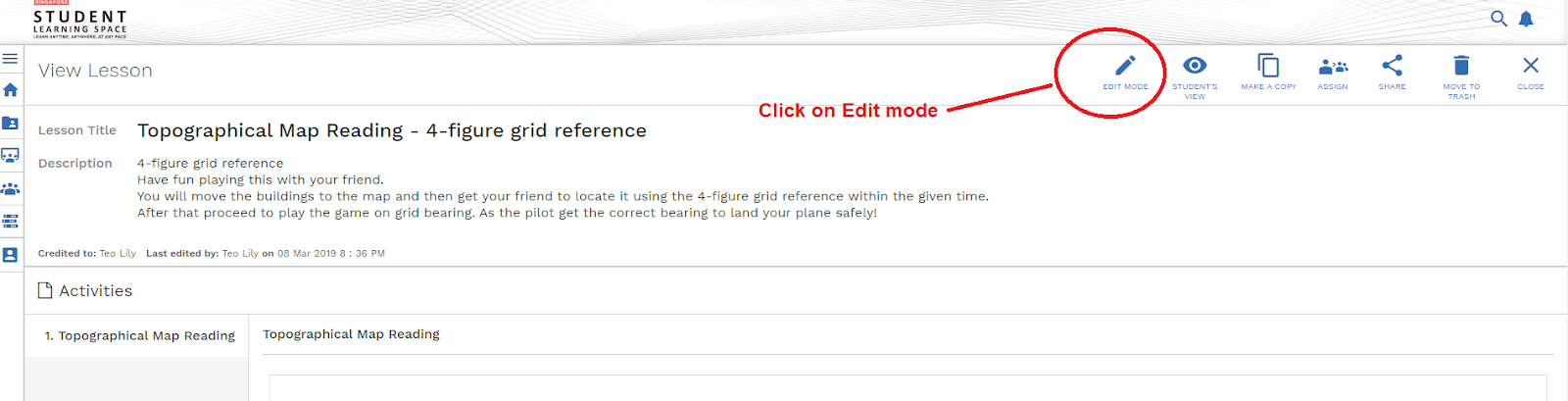
Click on edit in SLS

Uploading the zipped file as Media

Students'view

The students can play this interactive game in reading the grid reference in pairs.

Just realized the above can only be done on desktop.


Welcoming Singapore Teachers to join in the Sg Learning Designers Circle community on Facebook:
https://www.facebook.com/groups/sglearningdesigners/

Whitelisted websites for embedding into SLS (only via login to SLS)

Mar 2, 2019

Google Form Add-on

So grateful to freetech4teachers in sharing this
https://www.freetech4teachers.com/2019/03/my-5-favorite-google-forms-add-ons.html?m=1

Updated June 2021: Generating certificates for students
https://practicaledtech.com/2021/05/18/two-ways-to-automatically-generate-certificates-for-students/

Remember the amazing race Geohunt which I created using Google form?
http://ezitnew.blogspot.com/2018/05/google-form-and-qr-codes-amazing-race.html?m=1
How nice it will be to be able to issue the cert at the end of the race!

Certify'em is a Google Forms Add-on that makes it possible for you to automatically issue certificates to people who successfully complete your Google Form.
I tried out Certifyém and it is so impressive. The certificate is emailed to the respondent immediately upon completion of the quiz with the personalised name and date. Just customise the template on Google slide with {{Full Name}} and {{Date2}} then add on in Google Form by clicking on Add-on Certifyém. choosing the custom template. Shall introduce this to my other colleagues as even for CCA we are using Google form to certify them for the different badges - would be good to add on this on successful completion of the assessment.


List of merged tag you can use with the custom cert
 
You can make a copy of this Google Slide template which I created and save it in your drive to use as a customised template for Certify'em extension on Google form - https://docs.google.com/presentation/d/1jNtm7CUru-YYJMVWAHCHSmg29pbfA_mKtDsFgpSqZGQ/edit?usp=sharing


Remember to publish the Google slide template to the web (you can select this from the drop down under  File menu)

The following are the Google forms I created which I added certify'em. I gave the students as a form of checklist after I have covered every topic and they enjoyed receiving the certificate.
I was pleasantly surprised when a boy came up to me and ask me for the next one and I had to tell him we still have one more part to finish up the chapter. It's always a joy to see the students excited about learning.

Feedback for the various topics:


PG Weather and Climate https://docs.google.com/forms/d/1fMmZSsBuMVIdsimz7oCki2KDbQnwIJ2jq4ACmsB_VBs/copy

Elective Weather and climate https://docs.google.com/forms/d/1lVDxRbH9iHSUgKO2bDBeZOZvJL_xqyxF944BwhQ06xM/copy

Food resources 
https://docs.google.com/forms/d/1dy3yI1xoAwgqQopR-CTbRdZ7OHUY2vIZOSmm_MEIzZs/copy

Elective Food resources
https://docs.google.com/forms/d/1zyJE6lSZs_GT-8I3kLp8FfxFafl1q_Ug1BZzZrZwgKE/copy

Tourism 
https://docs.google.com/forms/d/18vmnpi-pahbu7BWjXK_OItq62s9PFyPAIVP05bIl1u8/copy

Tectonic Hazards https://docs.google.com/forms/d/1RYAc4kwk88tT9c7GKOo61am_A457kMhNv1EN6-8s6wY/copy

PG Coasts https://docs.google.com/forms/d/1Ayur7IuwVsnEZyD2tDBKGZjdT4uYShV7CoKirRzdQ0o/copy


PG Health and Diseases https://docs.google.com/forms/d/1QACRMAKPWWt5Dv0lyy9OLFyBHZ9m3Dyd8xU8qgca50k/copy

And Form Limiter would be great to limit responses

Form Limiter is an Add-on that lets you automatically stop accepting responses at a specified time or when you have reached a specified maximum number of responses.

Choice Eliminator is a Google Forms Add-on that lets you create a Form on which choices disappear after they have been used.

Checkitout is a Google Forms Add-on that makes it easy to keep track of the things that you let kids borrow from your classroom. To use CheckItOut you create a Google Form with a drop-down question that lists all of the items you want students to be able to borrow. CheckItOut will automatically create a second question in which students can check in the items that they borrowed.

Thirs will be great if I can use this for booking of consultation slots!

This has encouraged me to look farther into other add-on.


Timify Me will be great for the digital escape room!
My earlier post on the digital escape room shared in the sg learning designer circle. But look like quite a lot of work as you have to login to timifyme.com as well.
http://ezitnew.blogspot.com/2018/08/jigsaw-planet.html?m=1


Feb 26, 2019

Maths and Literature in Google Earth

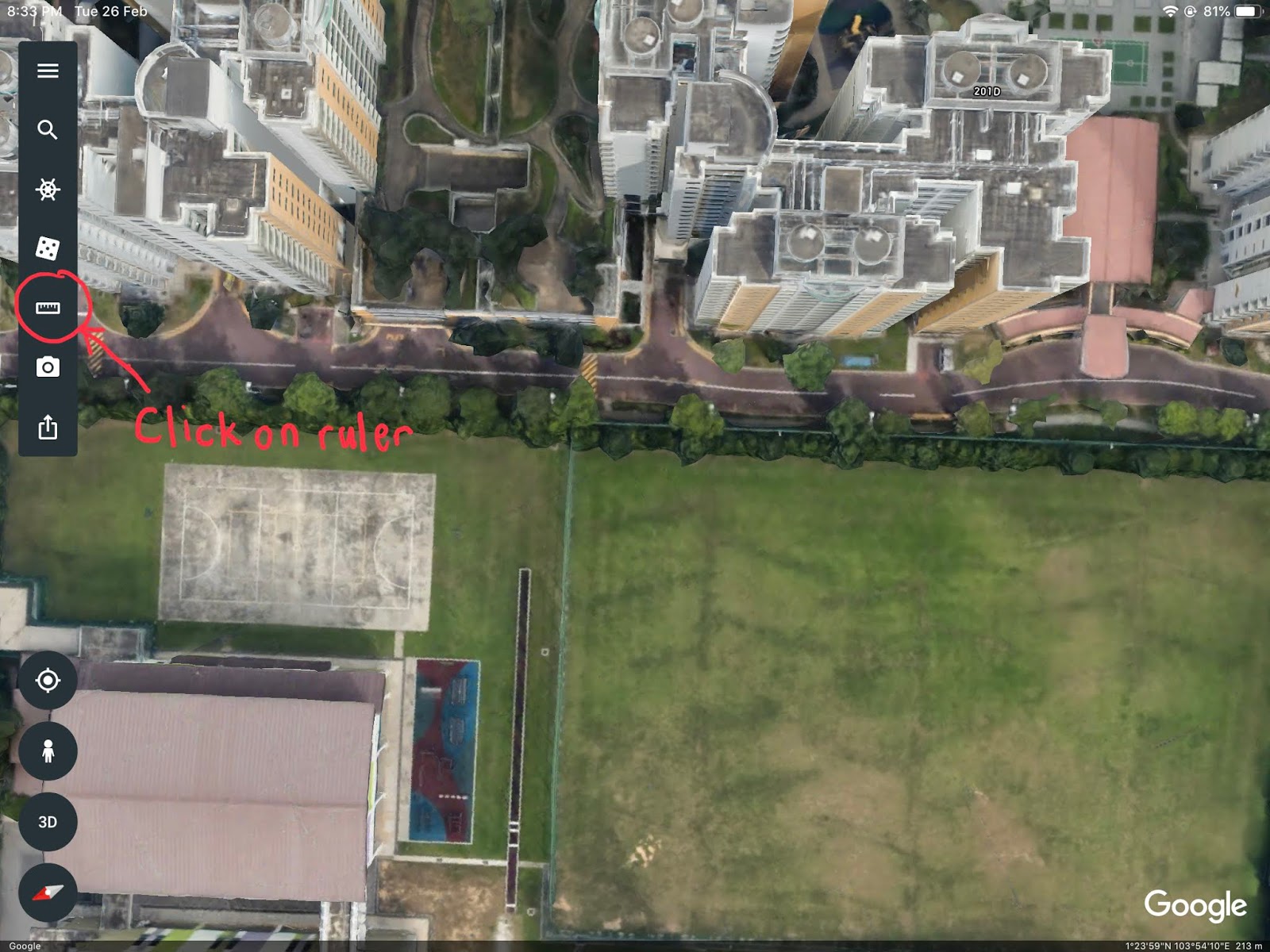
Have you tried Google Earth? Authentic assessment. What is the perimeter and area of our school field? How many rounds must you run to complete 2.4km around the school field? Cos getting my students to do a virtual field trip to England to measure the length and width of the coastal feature. Then realized it might be useful for Maths too. In the real world context.


For Lit or EL teachers. Google Earth can be used to explore the setting of a book. Many of the narration or stories could be based on places in the real world. They can find out more by "flying" to the places mentioned in the book as some of the places are very foreign to them and they fail to relate to. For more developed areas the 3D images will definitely awe your students. They can even create a path in Google earth to show the movement of characters in a story. As mentioned authentic assessment in the real world context. Students learn best when they can find the connection to the real world.

Lesson ideas from
Using Google Earth: Bringing the World into your classroom
By JoBea Holt 
Published by Shell Education 


My son commented that part of it might be outdated as you know much changes every year and the layer on temperature was removed. But the lesson ideas are still relevant.  

You can check out how I am using Google Earth for Geog. 
Upper Sec Physical Geog 

Sec 2 Geog 

Sec 1 Geog 

Jan 26, 2019

Embedding Geogebra in SLS

Great sharing for Maths and Science teachers on how to embed geogebra simulation into the SLS platform

https://physicslens.com/geogebra-in-sls/

Other SLS lessons shared
https://docs.google.com/spreadsheets/d/1IE4umznvgJQdX_bKXEYO3VxzUUy1ifdZW3jQ6uAO6_w/htmlview#

As embedding html code function will be available in SLS end of June, embedding geogebra will be much easier using the code! Embed the code just like for website!

Whitelisted websites for embedding into SLS (only via login to SLS)

Oct 18, 2018

Survey monkey and Google Form

Was looking at how to create a quiz which can assign points to the options instead of just points to the question.

Survey monkey could do the job but the free version only allowed 10 questions and there were 20 questions for the quiz. Another shortcoming is that the respondent can only see the score for each question and not the total score. https://www.surveymonkey.com/ The user interface is simple as shown below.


As mentioned in my earlier post I really love the Google suite - esp Google Form. However at first check, most of the sources on the web mentioned that points can only be assigned to the question and not the individual option in the question. Decided to try out the multiple choice grid which was new but was stuck cos though points can be assigned to the options (row), I could not uncheck the option when I have click on the wrong option. Eventually I used Checkbox Grid which did the trick!

However I still have some issue with the total score e.g. for the quiz it should be ___/60 but it became ___/120 cos it added up the score of all options. But not a big issue as respondent can be told that the actual score is over 60.


Change the form to a quiz under setting.

Then add the questions and select the question type as Checkbox Grid


I must say that the new feature on the option of question type checkbox grid and multiple choice grid would be extremely useful for the EL teachers e.g. for a quiz on parts of speech as shown below.


Sep 29, 2018

Maths in your hand

Not a maths teacher but must applaud this sharing by Yijie on how the learning can be made fun. Who would think of integrating Google drawing with the use of one's own palm to learn exponential curve and logarithmic curve. His blog also has many more interesting ideas in Maths.

https://borderlesslearningblog.wordpress.com/2018/01/29/mathematics-the-exam-hack-in-your-hand/