Just paste the text and you can download the audio file

Nov 16, 2011

Adding music to powerpoint slideshow
- Insert audio - select "insert audio from file"- browse for the file and click on ok.
- Click on animation pane and the animation pane will appear on the right hand side.
- Right click on the audio on the animation pane.
- A pop up menu will appear - choose start playing from slide 1. Choose stop playing on slide X - X being the last slide you have on your presentation.
- Click on transition - make sure you choose advance slide after 1 second or your desired timing for the slide transition.
Nov 3, 2011
Sharing by ETO
Sharing by Mr Shasi
http://portableapps.com/apps
Sharing by Su Ping:
http://www.wallwisher.com/
http://tricider.com/en/t/
http://portableapps.com/apps
Sharing by Su Ping:
http://www.wallwisher.com/
http://tricider.com/en/t/
Sep 28, 2011


Sep 16, 2011
Import and export favorite links on Internet Explorer
My colleague shared with us a very useful link with us today - how to export and import favourite links on our internet explorer.
http://windows.microsoft.com/en-SG/windows-vista/Import-or-export-favorites-in-Internet-Explorer
http://windows.microsoft.com/en-SG/windows-vista/Import-or-export-favorites-in-Internet-Explorer
Aug 2, 2011
Using Mind42
Sign up for a new account at http://mind42.com/mindmaps
You can invite members of your group to add on to the mindmap – collaborative learning.


You can invite members of your group to add on to the mindmap – collaborative learning.


ICT Face to face session 2 Aug
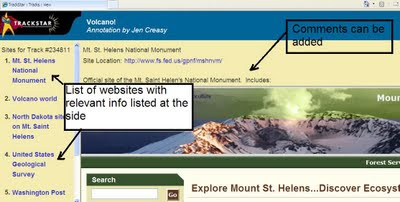
Learnt a useful tool for webquest today. Trackstar - Outline some links to articles and feed into the trackstar to create a thread no.
Customized search - List with the recommended articles and comments on top
http://trackstar.4teachers.org/
e.g. Volcano - Mt St Helen
http://trackstar.4teachers.org/trackstar/ts/viewTrackMembersFrames.do?org.apache.struts.taglib.html.TOKEN=ae4cdb41915891eb997897d9762b2371&number=234811&password=
alternate social working website:
Togetherville – social networking
Edmodo – social networking
https://sites.google.com/a/moe.gov.sg/humanities-face-to-face-meeting-online-discussion/home
Some other ideas by the teachers:
Glogster - eposter
SS- Governance
Group work – each group work on getting a source related to a selected issue
Scaffold for students’ learning
Fieldwork – videotape the hypothesis and others comment on it
Collate data using Microsoft Excel
Fieldwork – google site – upload photo, video – open up coveritlive for discussion.
Goanimate and Xtranormal
Diigo – webquest on project, process of research more visible – 2 page handout on migration – critical thoughts shown on their research.
Voicetthread
Google maps on coast – input on the pictures/map- coastal protection
http://www.mind42.com/
Tagxedo - a form of word cloud, however need to install silverlight
Pixton – comic strips to create storyboard
Newsmaker
Photostory
Customized search - List with the recommended articles and comments on top
http://trackstar.4teachers.org/
e.g. Volcano - Mt St Helen
http://trackstar.4teachers.org/trackstar/ts/viewTrackMembersFrames.do?org.apache.struts.taglib.html.TOKEN=ae4cdb41915891eb997897d9762b2371&number=234811&password=

alternate social working website:
Togetherville – social networking
Edmodo – social networking
https://sites.google.com/a/moe.gov.sg/humanities-face-to-face-meeting-online-discussion/home
Some other ideas by the teachers:
Glogster - eposter
SS- Governance
Group work – each group work on getting a source related to a selected issue
Scaffold for students’ learning
Fieldwork – videotape the hypothesis and others comment on it
Collate data using Microsoft Excel
Fieldwork – google site – upload photo, video – open up coveritlive for discussion.
Goanimate and Xtranormal
Diigo – webquest on project, process of research more visible – 2 page handout on migration – critical thoughts shown on their research.
Voicetthread
Google maps on coast – input on the pictures/map- coastal protection
http://www.mind42.com/
Tagxedo - a form of word cloud, however need to install silverlight
Pixton – comic strips to create storyboard
Newsmaker
Photostory
Jul 19, 2011
Passion day sharing - Blog Design
1. Register for a blog account
Register for a blog account at http://www.blogger.com/home
2. Click on create a new blog on the home page. You can also view your other blogs if you have already created them and edit or publish new posts.


6. Adding a Message Box
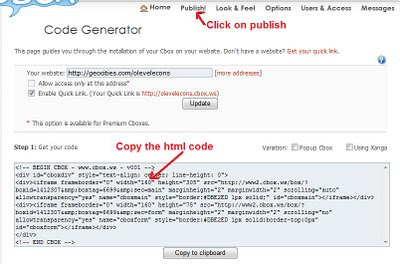
You can get your own cbox (chatbox for message) at http://cbox.ws/?r=3-2160578 After you have created an account with cbox, click on "publish" and you will see the html code. You can then copy the code into your blog design.
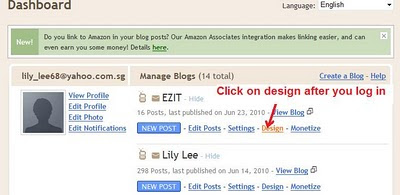
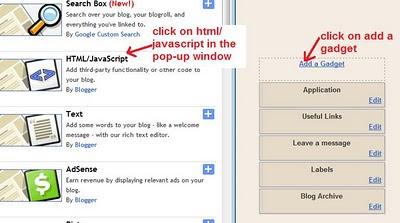
 Click on "design" on your dashboard, followed by "page elements" and then "add a gadget" - "html/javascript". Just paste the code which you have generated from cbox in the popup window.
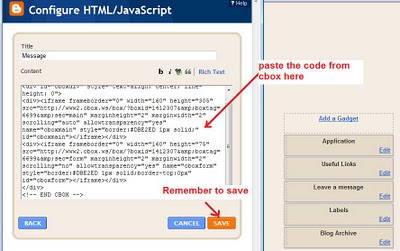 You can also control the messages posted by banning those who spam and delete the messages which you feel is inappropriate. With cbox- you can also trace the IP address of those who post the message.
7. Adding the flag counters
Log onto http://www.flagcounter.com/index.html to create your counter and then copy the html code.
In your blogger.com, follow the same steps as for adding the gadget for cbox earlier.
8. Adding the count down timer for an event on the side bar
You can get the html code from http://www.usflashmap.com/component/countdown_timer.htm?component_cdt=1
Again add the gadget - html code
Register for a blog account at http://www.blogger.com/home
2. Click on create a new blog on the home page. You can also view your other blogs if you have already created them and edit or publish new posts.

3. After you have clicked on new blog - a pop up window will appear as shown below. Type in the title of your blog as well as the url address. You will be prompted to change the address if it has already been taken.

4. After you have created your blog, you can start a new post.

5. You need to enter a title for your post and remember to click on 'Publish' to post it on your blog. However if you choose not to publish it yet, you can click on save to save what you have written. You can insert pictures and video using the menu above the space which you write your post. You can also add a label to categorise the content of your posts.


6. Adding a Message Box
You can get your own cbox (chatbox for message) at http://cbox.ws/?r=3-2160578 After you have created an account with cbox, click on "publish" and you will see the html code. You can then copy the code into your blog design.
Click on "design" on your dashboard, followed by "page elements" and then "add a gadget" - "html/javascript". Just paste the code which you have generated from cbox in the popup window. You can also control the messages posted by banning those who spam and delete the messages which you feel is inappropriate. With cbox- you can also trace the IP address of those who post the message.7. Adding the flag counters
Log onto http://www.flagcounter.com/index.html to create your counter and then copy the html code.
In your blogger.com, follow the same steps as for adding the gadget for cbox earlier.
8. Adding the count down timer for an event on the side bar
You can get the html code from http://www.usflashmap.com/component/countdown_timer.htm?component_cdt=1
Again add the gadget - html code
Apr 1, 2011
Use of Microsoft Excel for simple calculations and creating charts - climatic graphs
Open the link below for the excel sheet: https://spreadsheets.google.com/spreadsheet/ccc?key=0AtUR3aEsvgerdENtUmE5S0N5ZGNueGozb1lqcUVTY0E&hl=en_US
Data on Singapore's temperature from:
http://www.worldclimate.com/cgi-bin/data.pl?ref=N01E103+1102+48694W
Data on Singapore's rainfall from:
http://www.worldclimate.com/cgi-bin/data.pl?ref=N01E103+2100+48694W
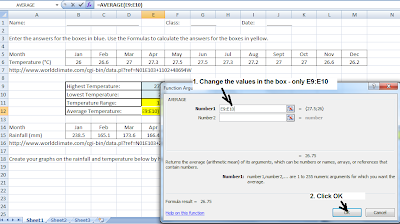
Calculating Temperature range: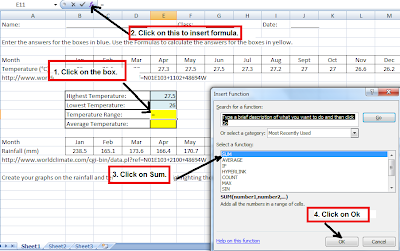
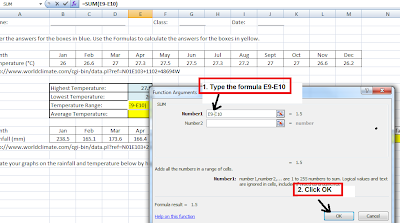
Creating a temperature graph with Chart Wizard:


 Creating a rainfall graph with Chart Wizard


 You can also create a climatic graph by inserting combo chart using Microsoft excel.

It is also simple and useful especially when you have two sets of data for the Y axis. As shown below - air temperature and relative humidity.

Data on Singapore's temperature from:
http://www.worldclimate.com/cgi-bin/data.pl?ref=N01E103+1102+48694W
Data on Singapore's rainfall from:
http://www.worldclimate.com/cgi-bin/data.pl?ref=N01E103+2100+48694W
Calculating Temperature range:

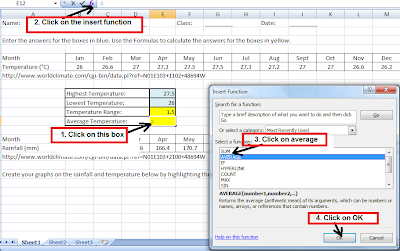
Calculating average temperature:
Calculate total rainfall 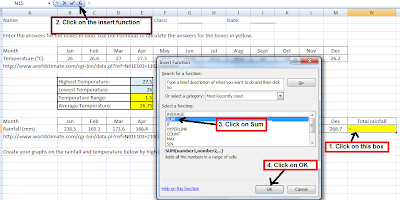
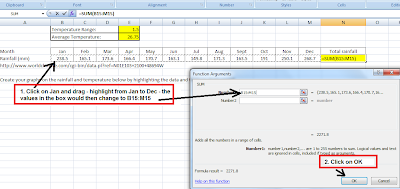
Creating a temperature graph with Chart Wizard:


 Creating a rainfall graph with Chart Wizard


It is also simple and useful especially when you have two sets of data for the Y axis. As shown below - air temperature and relative humidity.

ICT Mentor Program Day 3 - Humanities
Tools used today:
http://mindmeister.com/ - mindmap
http://lms.asknlearn.com/moe - discussion
http://www.prezi.com/ - presentation
Activity 1
We tried mindmeister on the topic of globalisation. This is much better than Freemind in that images, notes and links can be inserted. The members of the shared map can work collaboratively in creating the mindmap. You can create the icon on the bottom menu (1st icon on left)- toggle on the history of the creation of the mindmap.
Teacher can track the process by looking at the history. Teacher can also track who has contributed to the mind map. The students can revisit and work on the map again. The teacher can also create a template for the students to work on. Allow collaboration, sharing, changes and improvements to be made.
Question of assessment?
Challenges: Bandwidth, logistics, booking of computer labs, back-up plan e.g. worksheets, classroom management.
Part of ICT training rather than subject time - so that they are familiar with it and they can anchor and apply in other subjects.
Webspiration - advantage - many ready templates for use. Allow the students to work collaboratively - like a whiteboard. It can be embedded and exported as well. The map can be shared and embedded in blogs or websites. It can also be exported in pdf or gif format.
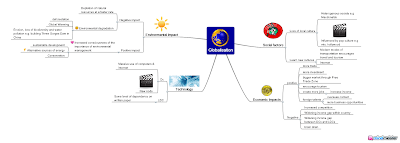
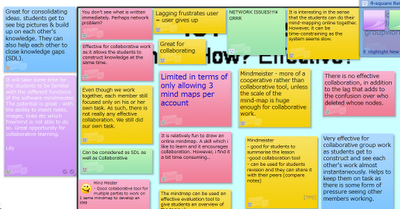
Activity 2: Forum discussion
We tried this on the asknlearn platform. The teachers can export the discussion in excel format and do the grading with the rubrics generated from Rubistar.
Threaded - can see who responded. Allow students to think and post at their own pace with thoughts. Spell check function. Teacher can remove post or ban user.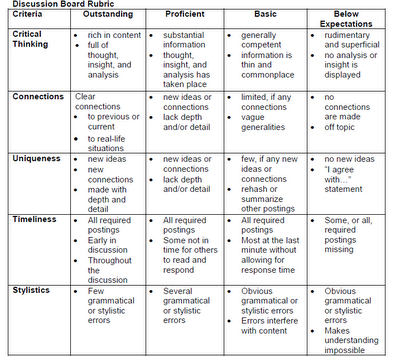
Challenges - motivation, time-consuming
Source/ pictures as a stimulus, graded
Classroom opportunities or out of the classroom context.
Activity 3:
We made use of prezi for the presentation of a personality linked to globalisation. Our group worked on Mark Zurkenburg, the founder of Facebook.
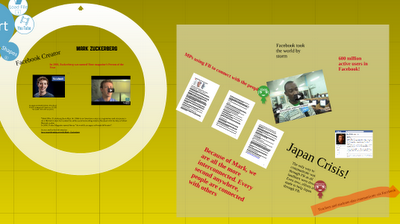 Other presentation tools includes animoto, photostory 3, VoiceThread, Acapela.tv, comic strips such as toondoo and bitstrips
Additional Resource:
You may find additional lesson resources on globalisation in edumall shared and uploaded by CPDD. Please access edumall here.
Lesson Package on Airbus (104.2MB) includes video http://library.edumall.sg/cos/o.x?c=/library/reslib&uid=&ptid=84&func=view&id=52096&fext=.zip
Lesson Package on Kyoto Protocol (114.5MB) includes video http://library.edumall.sg/cos/o.x?c=/library/reslib&uid=&ptid=84&func=view&id=52095&fext=.zip Short Clip on iPod (video) http://library.edumall.sg/cos/o.x?c=/library/reslib&uid=&ptid=84&func=prop2&id=43907
There are other resources on weblinks and newslinks, etc. at the site.
Other resources
1. You may want to refer to the Language Page for additional resources here
2. Cooltoolsforschools
3. Cool tools - educational games
4. Bloom's and ICT tools
5. Simple K12
Here are some other more popular online rubric makers
http://www.teach-nology.com/web_tools/rubrics/
http://www.rcampus.com/indexrubric.cfm
http://mindmeister.com/ - mindmap
http://lms.asknlearn.com/moe - discussion
http://www.prezi.com/ - presentation
Activity 1
We tried mindmeister on the topic of globalisation. This is much better than Freemind in that images, notes and links can be inserted. The members of the shared map can work collaboratively in creating the mindmap. You can create the icon on the bottom menu (1st icon on left)- toggle on the history of the creation of the mindmap.
Teacher can track the process by looking at the history. Teacher can also track who has contributed to the mind map. The students can revisit and work on the map again. The teacher can also create a template for the students to work on. Allow collaboration, sharing, changes and improvements to be made.
Question of assessment?
Challenges: Bandwidth, logistics, booking of computer labs, back-up plan e.g. worksheets, classroom management.
Part of ICT training rather than subject time - so that they are familiar with it and they can anchor and apply in other subjects.
Webspiration - advantage - many ready templates for use. Allow the students to work collaboratively - like a whiteboard. It can be embedded and exported as well. The map can be shared and embedded in blogs or websites. It can also be exported in pdf or gif format.
Activity 2: Forum discussion
We tried this on the asknlearn platform. The teachers can export the discussion in excel format and do the grading with the rubrics generated from Rubistar.
Threaded - can see who responded. Allow students to think and post at their own pace with thoughts. Spell check function. Teacher can remove post or ban user.
Challenges - motivation, time-consuming
Source/ pictures as a stimulus, graded
Classroom opportunities or out of the classroom context.
Activity 3:
We made use of prezi for the presentation of a personality linked to globalisation. Our group worked on Mark Zurkenburg, the founder of Facebook.
 Other presentation tools includes animoto, photostory 3, VoiceThread, Acapela.tv, comic strips such as toondoo and bitstrips
Additional Resource:
You may find additional lesson resources on globalisation in edumall shared and uploaded by CPDD. Please access edumall here.
Lesson Package on Airbus (104.2MB) includes video http://library.edumall.sg/cos/o.x?c=/library/reslib&uid=&ptid=84&func=view&id=52096&fext=.zip
Lesson Package on Kyoto Protocol (114.5MB) includes video http://library.edumall.sg/cos/o.x?c=/library/reslib&uid=&ptid=84&func=view&id=52095&fext=.zip Short Clip on iPod (video) http://library.edumall.sg/cos/o.x?c=/library/reslib&uid=&ptid=84&func=prop2&id=43907
There are other resources on weblinks and newslinks, etc. at the site.
Other resources
1. You may want to refer to the Language Page for additional resources here
2. Cooltoolsforschools
3. Cool tools - educational games
4. Bloom's and ICT tools
5. Simple K12
Here are some other more popular online rubric makers
http://www.teach-nology.com/web_tools/rubrics/
http://www.rcampus.com/indexrubric.cfm
Subscribe to:
Posts (Atom)